Network Connectivity Logger (V-Ping)
Table of Contents
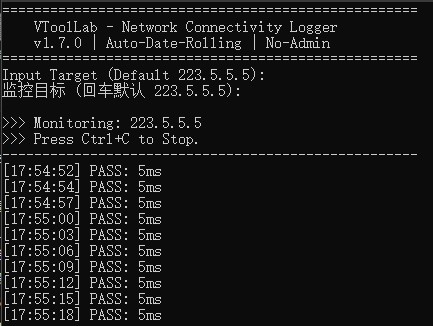
🔍 Why V-Ping Logger instead of System Ping?#
Standard Windows ping has three major drawbacks for long-term troubleshooting:
- No Persistence: History is lost once the console window is closed.
- Missing Timestamps: You see the packet loss, but not the exact time it occurred.
- Hard to Analyze: Raw text output is nearly impossible to visualize or graph.
V-Ping Logger acts as your network’s “Black Box”, capturing every detail for you.
🌟 Key Features#
- 📅 Auto-Date Rolling: Supports 24/7 monitoring; creates a new log file automatically every midnight.
- 📊 Spreadsheet Ready: Generates standard
.csvfiles for easy analysis and graphing in Excel/Google Sheets. - 📝 Statistical Report: Auto-calculates Packet Loss %, Min/Max Latency, and Average Latency upon exit.
- 🌍 Bilingual Interface: Professional CLI experience with both English and Chinese support.
💻 System Requirements#
- OS: Windows 10 / 11 (64-bit).
- No Admin Required: Run it directly with standard user privileges—no UAC prompts.
- Portable: Single executable file; no installation or registry changes.
- Reliable Node: Defaults to
223.5.5.5(AliCloud DNS) for maximum probe stability.
📥 Download Now#
🚀 Download for Windows (zip)Privacy Note: Developed by VToolLab. Pure, ad-free, and fully offline. We do not collect or upload any data.
💡 Use Cases#
- Remote Work: Gather evidence of connection drops to show your ISP when reporting service issues.
- Gamers: Identify whether lag spikes are caused by your local router or the ISP’s routing path.
- Traders: Ensure your trading environment remains stable and low-latency throughout the session.
There are no articles to list here yet.