v-dbf: Lightweight DBF to CSV Automation Tool
Table of Contents
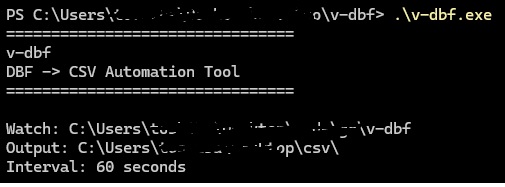
Legacy data, automatically converted to CSV. v-dbf is a lightweight tool from vtoollab.com designed to automate traditional DBF data conversion. It continuously monitors a directory, detects .dbf files, reads their fields and records, and generates corresponding .csv files automatically.
Core Advantages#
- Automatic DBF Detection: Periodically scans the configured directory and its subdirectories for
.dbffiles. - Complete Data Conversion: Reads both DBF field definitions and complete data records instead of exporting only the table structure.
- Multiple Field Types: Supports common DBF field types including character, numeric, floating-point, date, logical, and integer fields.
- Deleted Record Handling: Detects DBF deletion flags and skips records marked as deleted.
- Standard CSV Output: Uses Go’s standard CSV writer to correctly handle commas, quotes, and other special characters.
- Simple JSON Configuration: Configure the watch directory, output directory, scan interval, and overwrite behavior through
config.json. - Single Binary, Zero Dependencies: Built with Go and requires no Python, database server, or third-party DBF software.
How to Use#
- Prepare your
.dbffiles and place them in the configured watch directory. - Configure
config.jsonwith the DBF source directory and CSV output directory. - Run
v-dbf.exeto start automatic scanning. - Convert v-dbf automatically generates a CSV file with the same filename as the original DBF file.
Configuration Example (config.json)#
{
    "watch_dir": "D:\\DBF",
    "output_dir": "D:\\CSV",
    "interval": 10,
    "overwrite": false
}
Configuration options:
watch_dir   Directory to monitor for DBF files
output_dir  Directory for generated CSV files
interval    Scan interval in seconds
overwrite   Whether to overwrite existing CSV files
For example:
D:\DBF\etfstock512870.dbf
              ↓
           v-dbf
              ↓
D:\CSV\etfstock512870.csv
Typical Use Cases#
v-dbf is particularly useful for legacy systems that still use DBF files for data storage or data exchange, including:
- FoxPro / Visual FoxPro
- Legacy ERP systems
- Financial data systems
- Historical securities and financial systems
- Internal enterprise data exchange
- Legacy Windows applications
For systems that generate DBF files on a regular schedule, simply keep v-dbf running and let it handle the conversion automatically:
DBF generated
     ↓
v-dbf detects it
     ↓
Read records
     ↓
Generate CSV
     ↓
Downstream processing
⬇️ Download v-dbf.zip#
Version: 0.1.0 | Platform: Windows (x64)
There are no articles to list here yet.