v-ntp: High-Precision NTP & Link Quality Analyzer
Table of Contents
🔍 Why V-NTP over System Default Sync?#
Standard Windows Time sync is a “black box”—it only tells you if it succeeded. For high-frequency trading, distributed logging, or forensic analysis, it falls short:
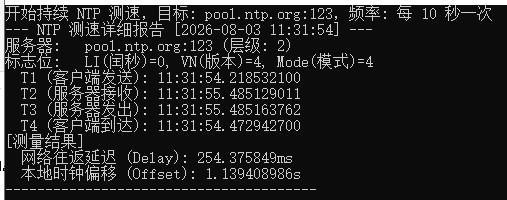
- Lack of Detail: You can’t see the T1/T2/T3/T4 timestamps to identify whether congestion is on the uplink or downlink.
- No Historical Logs: It’s hard to track how your local clock drifts over 24 hours.
- Complex Debugging: In enterprise environments, quickly verifying an NTP server’s Stratum or response quality is difficult.
V-NTP Tester makes every time-sync packet transparent and measurable.
🌟 Key Features#
- ⏱️ Four-Stage Timestamps: Full breakdown of Originate, Receive, Transmit, and Destination timestamps (nanosecond precision).
- 📡 Link Quantification: Automatic calculation of Round Trip Delay and Clock Offset.
- 📝 Automated Logging: Supports 24/7 monitoring with daily log rotation and CSV compatibility for Excel analysis.
- 🌍 Multi-language & Timezone: Supports English/Chinese and custom timezone display for global testing.
- ⚙️ Smart Config: Automatically generates
config.jsonon first run; easy to customize intervals and targets.
💻 Environment & Installation#
- OS: Windows 10 / 11 (64-bit).
- Zero Privileges: No Administrator rights required for testing mode.
- Portable: A single ~3MB executable file, no registry changes, no residue.
- Default Target: Pre-configured to
pool.ntp.org, supports local intranet NTP sources.
📥 Download Now#
🚀 Download Windows Portable Version (zip)Privacy Statement: Developed by VToolLab. Communicates only via UDP port 123. Completely offline, no data collection or transmission.
💡 Typical Use Cases#
- Financial Trading: Monitor microsecond-level deviations from reference time to ensure order timestamp validity.
- Distributed Systems: Deploy on multiple nodes to track clock drift patterns, helping debug distributed locks or transaction conflicts.
- Network Assessment: Use NTP packet RTT to evaluate UDP stability between your site and specific Data Centers.
There are no articles to list here yet.