v-trace: Full-Path Matrix Network Demarcation Tool
Table of Contents
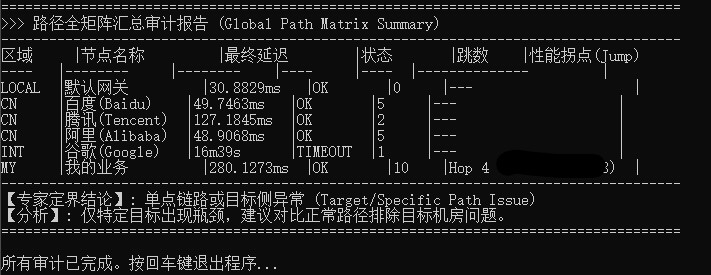
“Let hard data speak; stop guessing where the network fails.” v-trace is an expert-grade diagnostic utility from vtoollab.com engineered to resolve complex network disputes in production environments. When a system experiences lag or timeouts, v-trace performs a full-path matrix scan, capturing latency jump-points at every hop to provide an authoritative verdict on liability.
Key Features#
- Full-Path Matrix Aggregation: [Core Breakthrough] Moves beyond single-target probing. Automatically iterates through all configured nodes (Local Gateway, Domestic Landmarks, Global Backbones, and Custom Targets) to run deep traceroutes and compile everything into a single comparison matrix.
- Automated Jump Point Detection: Built-in algorithms analyze latency deltas between consecutive hops. The moment a dramatic spike occurs (e.g., jumping from 5ms to 200ms), it automatically flags the node as a
Jump Point, pinpointing the exact failure location. - Native Charset Correction: Includes an integrated real-time GBK-to-UTF8 decoding engine, eliminating garbled characters and text misalignment common when parsing Windows CLI output.
- Dual-Engine Architecture: Employs parallel TCP screening for instantaneous connectivity snapshots, followed by ordered sequential path tracing to prevent high-concurrency traceroutes from swamping the local stack.
- Pre-populated Global Landmarks: Generates
tasks.txton first run with built-in benchmarks (Baidu, Alibaba, Tencent, Google, Cloudflare) to establish indisputable network baseline context.
Use Cases#
- Dev vs. NetOps Demarcation: When developers claim “the network is slow,” cross-reference targets with public landmarks to instantly prove whether the bottleneck lies in the application layer or the network pipe.
- VPN / Global Proxy Detection: Automatically checks the first hop (Hop 1) latency across all targets. If Hop 1 spikes universally, it definitively points to local proxy software or router saturation.
- Cross-Border Route Auditing: Evaluate the stability and hop count of critical infrastructure across different ISPs and international links.
Configuration Example (tasks.txt)#
# Category | Name | Host | Port
LOCAL | Gateway | 192.168.1.1 | 80
CN | Baidu_CN | www.baidu.com | 443
CN | Tencent_CN | www.qq.com | 443
INT | Google_Global | google.com | 443
MY | Core_API | api.yourdomain.com | 443
⬇️ Download Now: v-trace.zip#
Version: 8.0.0 | System: Windows (x64)
There are no articles to list here yet.